
Category Archives: Artificial Intelligence

Kanji Passport: A Free Telegram App for Learning Japanese Kanji

Although this may be a slight deviation from technical translation, today I would like to share something more personal: my side project, Kanji Passport, a free kanji learning app deployed on Telegram.

Japanese kanji has been both my passion and my challenge for a long time. Anyone who has studied Japanese knows that kanji are not just characters to memorize. They are a complex system of meanings, readings, components, radicals, visual patterns, and associations. They can be beautiful, logical, confusing, frustrating, and rewarding — often all at the same time.

For a long time, I wanted to turn my interest in kanji into something useful and practical. Finally, with the help of modern tools, including Codex, and free Japanese language learning resources available on the internet, I decided to create a simple app that would make kanji learning more accessible.

That is how Kanji Passport was born.

What Is Kanji Passport?

Kanji Passport is a Telegram-based app that helps users explore and review Japanese kanji directly inside Telegram.

There are already many powerful kanji learning apps available online. However, I wanted to create something specifically for Telegram users — something lightweight, convenient, and always available at your fingertips.

The idea is simple: open the bot, choose a kanji, check its meaning, readings, radical, examples, stroke order, and memory hint — all in one place.
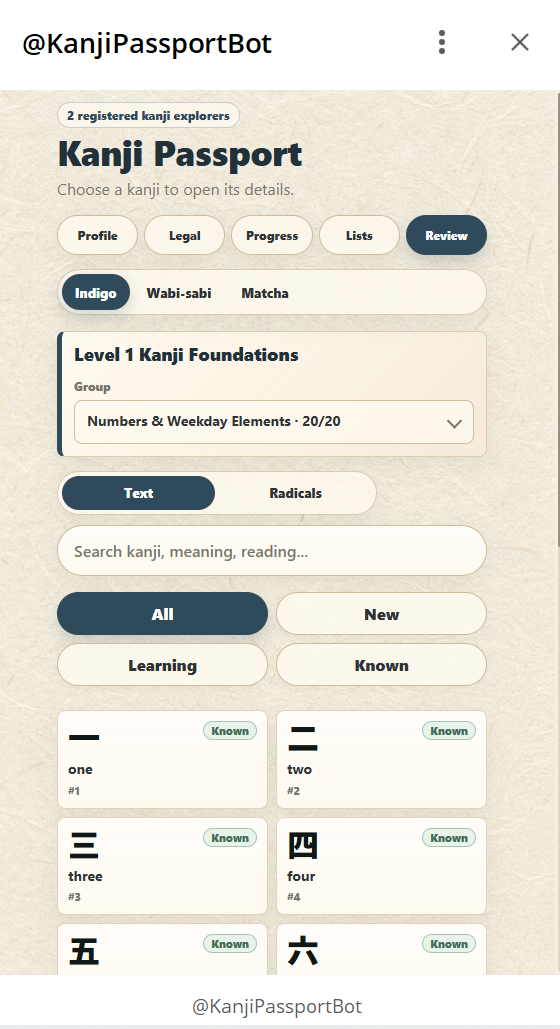
Main screen of Kanji Passport with levels, thematic groups, search, filters, and kanji cards.

Kanji Passport currently covers 2,139 kanji.

They are divided into levels and thematic groups within each level. The structure follows, to some extent, the order in which kanji are taught in the Japanese school system, but the app does not simply reproduce a school-grade list.

Instead, the app presents kanji as a journey.

Each level works like a stage of progress. Within each level, kanji are grouped by themes.

This thematic structure helps learners see kanji not as isolated symbols, but as connected elements of meaning. Instead of memorizing random characters one by one, users can study related kanji together and gradually build a mental map of how meanings, radicals, and components are linked.

Kanji Cards with Readings, Radicals, and Stroke Order

Each kanji has its own card. The card includes the character, its basic meaning, on’yomi and kun’yomi readings, radical information, examples, and stroke order.

Stroke order is especially useful for beginners because kanji are not only read — they are also written. Seeing how a character is built stroke by stroke helps users understand its internal structure and remember it more naturally.
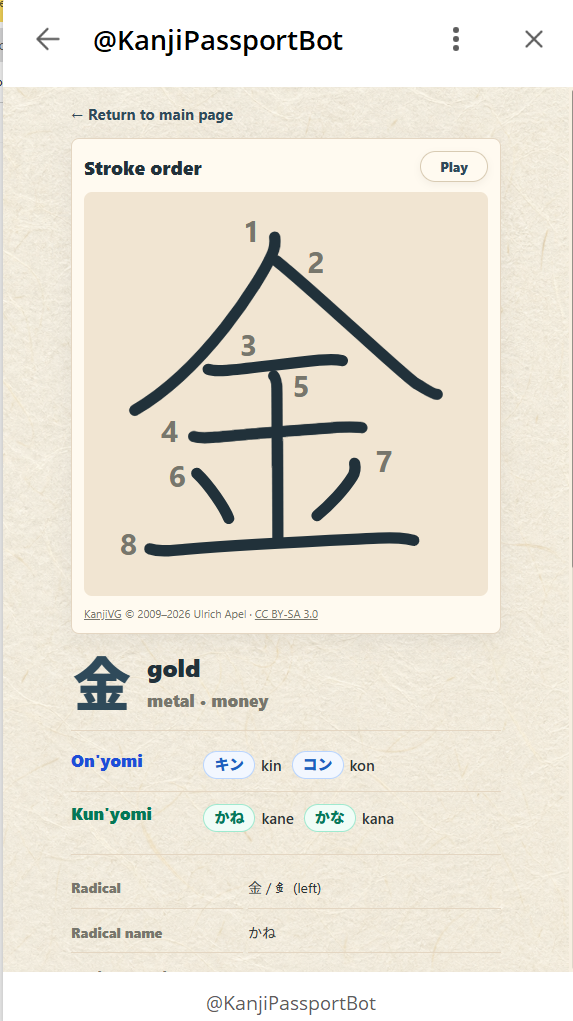
Kanji card for 金, showing stroke order, meaning, readings, radical information, and character details.

Personalized Study Lists

One of the key features of Kanji Passport is the ability to create personalized study lists.

Users can explore kanji not only by level or thematic group, but also by:

  • main radical;
  • reading;
  • meaning;
  • study status.

This makes the app useful for different types of learners. A beginner can move through the levels step by step. A more advanced learner can create a focused list, for example, all kanji with a certain radical or all kanji connected with a particular meaning.

Memory Hints and Mnemonics

Each kanji card includes a Memory hint — a short mnemonic that helps the learner remember the kanji, its components, or its visual structure.

I believe mnemonics are one of the most helpful tools for kanji learning. A complicated character becomes easier to remember when it is broken into smaller parts and connected with a simple image or story.

Kanji Passport also allows users to create their own personal memory hints.

The app also has shared hints, which opens the door to a more creative and interactive way of learning. Users can compare memory hints and even compete in writing better mnemonics for kanji.
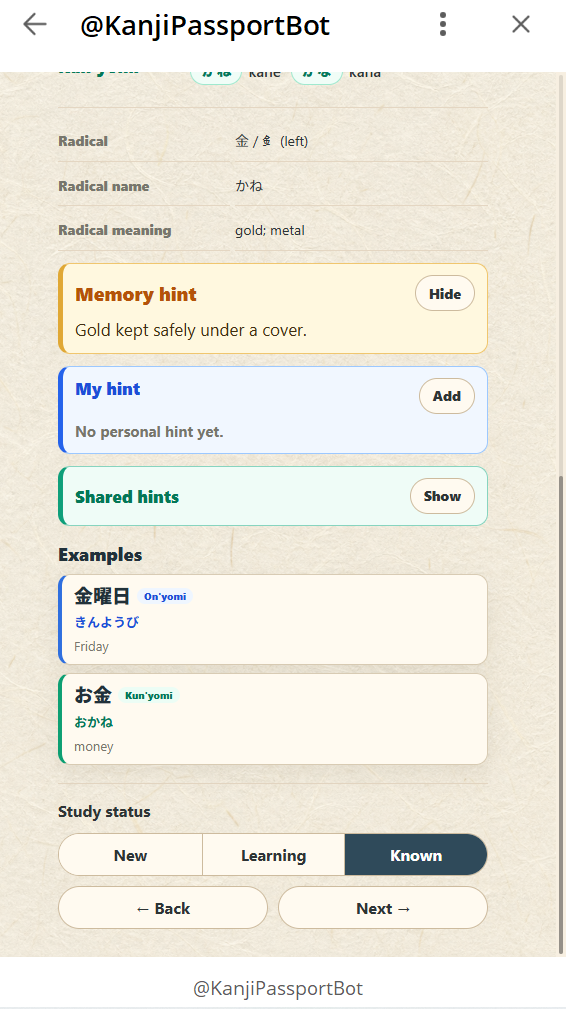
Memory hint, personal hint, shared hints, examples, and study status on a kanji card.

A Supplement to Your Kanji Journey

Kanji Passport is not meant to replace textbooks, dictionaries, grammar study, or real reading practice. Kanji should always be learned in context, through real words and real Japanese.

However, I hope the app can serve as a useful supplement to your Japanese kanji journey.

Kanji are difficult, but they are also fascinating. Each character is like a small passport stamp from the world of Japanese language and culture. The more stamps you collect, the further your journey goes.

If you are learning Japanese or simply interested in kanji, feel free to check out the app on Telegram:

Open Kanji Passport on Telegram

The Translator’s New Companions: True Allies or False Friends?

Not long ago, discussions about AI in translation sounded like a clash between two camps: some saw it as the profession’s killer, while others saw it as a savior from routine work. Earlier, I wrote that the impact of AI on the industry is still impossible to judge unequivocally, but one thing is clear: the technology will be a major part of the future. Those who survive (and grow) will be the ones who can strike the right balance between AI and human expertise — understanding not only the benefits, but also the limitations.

This article is a continuation. No abstract slogans and no panic. I want to talk about the practical side: which “new companions of the translator” have already settled on the desktop, why among them there are both real friends and “false” ones, and how to set up your workflow so that technology increases quality, not just speed.


The profession hasn’t disappeared — the role has changed

AI has dramatically reduced the cost of a “first draft”. That’s a fact. But clients are still not buying a set of sentences in another language. They are buying a result: accuracy, style, accountability, and predictable quality.

Only recently, a translator was often “someone who translates”. Today, a translator is increasingly someone who:

  • sets the task (what exactly needs to be done and in what style),
  • creates or receives a draft (including with the help of AI),
  • checks and edits it to a level they can confidently vouch for,
  • builds a system (terminology, QA, unified rules),

AI does not cancel the profession. It shifts the center of gravity from “typing the first version” to “controlling meaning and quality.”


A Tool Belt: Expanding the Translator’s Capabilities

I like to talk about tools plainly and honestly. Today my work rests on three “friends”: ChatGPT, PyCharm, and my own applications. Each has a strong side. And each can turn into a false friend if you use it without a system.

1) ChatGPT — a fast drafting partner (and a source of confident mistakes)

For me, ChatGPT is a thought accelerator. It doesn’t “translate instead of me”. It helps me get through the first mile faster — the part that usually consumes the most energy: making sense of a messy source text, generating options, finding a natural phrasing, building the structure of a letter or instructions, and adjusting tone.

Typical tasks where it helps:

  • offer several variants of the same phrase (neutral / formal / conversational),
  • rephrase “bureaucratic Russian” into natural English (or vice versa),
  • extract key requirements from a brief or SOW,
  • compile a rough glossary from the text and propose consistent terms,
  • help with a short summary, an email to the client, or translator’s notes.

But at the same time, ChatGPT is a classic “false friend”. The danger isn’t that it makes mistakes (everyone does). The danger is that it makes mistakes confidently.

Here is where it most often lets you down:

  • it “fills in” facts that are not in the source,
  • it smooths and simplifies meaning (which is critical in law, engineering, and medicine),
  • it invents “plausible-sounding” terms,
  • it can preserve style while losing precision.

That’s why I treat it like a very fast intern: helpful, but in need of verification. It saves time, but it doesn’t remove responsibility.

The rule that saves me:
AI produces an option. I make the decision and take responsibility for the meaning.

2) PyCharm — be your own developer

Translators often think that programming is “not for us”: we weren’t taught it, and there’s no time for it. That used to be true, but with the arrival of AI a lot has changed: with a properly defined task, it becomes a guide and a personal assistant in the world of code — it helps sketch a script, explains errors, suggests solution options, and shortens the path from an idea to a working button.

Of course, there are pitfalls: AI can skip code fragments, mix up dependencies, or be confidently wrong, so basic knowledge and the habit of checking the result are a big plus. But you no longer need to spend years to become a professional programmer. Even today you can use AI to build small apps for your own tasks and turn routine work into an automated process.

3) Your own apps — narrow tools beat universal ones

At some point I realized: universal services are good, but they rarely solve a translator’s specific task perfectly. So I built my own applications: for alignment and translation-memory building, for working with spreadsheets, for preparing materials, and for automating recurring scenarios.

The point is not to “reinvent the wheel”. The point is to build a tool that is as “tailored to your own process” as possible.

And in my view, this is one of the key turns of the profession in the AI era: a translator becomes not only a practitioner, but also the architect of their own workflow pipeline.

By the way, you can find examples of my own applications in the Tools section of this website.


What’s next: work, food for thought, and growth

We really don’t yet know what the translation market will look like five years from now. But the main thing is already visible: technology is becoming a mandatory part of the profession. And the question is not whether AI will come. The question is whether the translator will have a system — tools, checks, discipline, and a willingness to learn.

AI can be both a helper and a “false friend”. It becomes a true friend when a translator stops limiting themselves, accepts the new reality as a given, and keeps developing — not out of fear, but out of curiosity.

Because in a world where first drafts have become cheaper, what is especially valued is what has always been rare: accuracy, accountability, a feel for language, and the ability to think.

The Impact of AI on the Translation Industry

The opening of the Channel Tunnel in 1994 raised concerns among ferry owners that the new tunnel would put them out of business. Initially, the convenience of the tunnel did result in a sharp decline in ferry transportation. However, ferry companies were able to adapt and compete with the tunnel in the long term, and passenger traffic eventually rebounded. While the impact of the tunnel on ferry transportation may not have been as clear-cut as initially thought, the situation still provides a valuable lesson in how technological advancements can lead to unexpected results. This raises important questions about the potential impact of AI technology on the translation industry and the need for careful consideration of its integration.

RobotTranslator

Similarly, some may fear that AI technology in translation will make human translators obsolete. However, as with the Channel Tunnel, it is possible that AI and human translation services will complement each other, resulting in greater overall demand for language services. While AI technology can improve the speed and efficiency of translations, there are still many situations where human expertise is necessary to ensure accuracy and nuance. This means that AI and human translators will continue to coexist in the industry for the foreseeable future.

As the translation industry evolves with the integration of AI technology, translators may also need to acquire new IT skills to adapt to the new reality. This can include familiarity with translation management systems, machine translation engines, and other tools used in AI-assisted translation workflows. Additionally, translators may need to develop new areas of specialization to differentiate themselves from AI technology and offer added value to clients.

The key is for translators to embrace this new reality and continue to develop their skills and expertise to remain relevant and competitive in the industry. This may involve collaboration with AI technology rather than fearing it, as well as a willingness to continually learn and adapt to changing industry trends and client needs.

However, integrating AI into translation workflows presents challenges and ethical considerations that require careful consideration and management. For example, ensuring data privacy and security, and avoiding biases in the training data and algorithms used in AI translation. It is important for translation companies and language professionals to stay informed about these issues and to prioritize transparency and accountability in the use of AI technology in translation.

In conclusion, the impact of AI on the translation industry is not yet fully known, but it is clear that it will play a significant role in shaping the future of the industry. By striking the right balance between AI and human expertise, and by staying informed about the potential benefits and limitations of AI technology, translation companies and language professionals can navigate this new landscape and continue to provide high-quality language services to clients around the world. Translators should view AI technology as a tool to improve their work rather than as a threat to their profession. With the right mindset, translators can leverage AI technology to improve efficiency, reduce costs, and ultimately provide more value to their clients.